Ownership
What information is displayed for an entity’s Ownership?
-
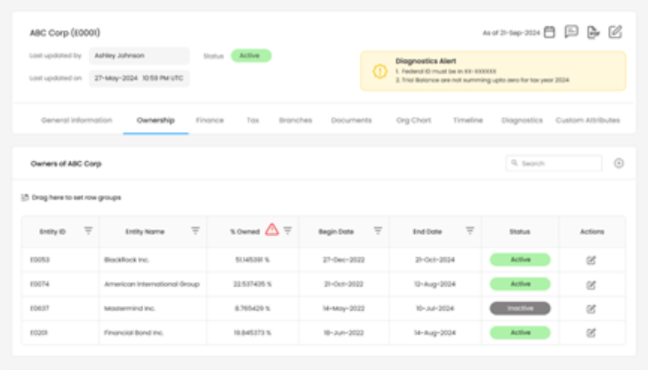
The Ownership displays details about the entity’s owners, including:
-
Entity ID
-
Entity Name
-
Percentage Owned
-
Begin Date and End Date of ownership
-
Status of ownership (Active/Inactive)
-
Actions to edit ownership details.
-
How to add a new owner to an entity?
- To add an entity owner, the user must select the Add option “+” under the Ownerships tab.
What information is required when adding an entity owner?
To add an entity owner, the user must provide the following details:
-
Entity ID
-
Entity Name
-
Percentage Owned
-
Begin Date
Can there be multiple owners of a single entity?
- Yes, there can be multiple entity owners for a single entity.
How to edit the ownership details of an entity?
- To edit ownership details, click the edit icon under the Actions column for the respective owner.
Which fields can be modified when editing an entity owner?
- Only the end date can be modified.
What does the red alert icon next to % Owned indicate?
-
The red alert icon indicates a calculation error in the ownership percentage.
-
When an entity owner is added, edited, or marked as active/inactive, the ownership calculation must ensure that the total percentage owned equals 100%. If the sum does not equal 100%, the red alert icon is displayed to notify the user of the discrepancy.
What happens if ownership status is inactive?
- Inactive ownership means that the ownership period has ended
What does the start & end date signify?
The start and end dates indicate the period during which the entity owner-maintained ownership of the entity.
-
Start Date: Specifies when the ownership began.
-
End Date: Indicates when ownership ended. This can be provided by the user if the ownership needs to be terminated before the entity itself is end-dated (e.g., due to sale, merger, or dissolution).